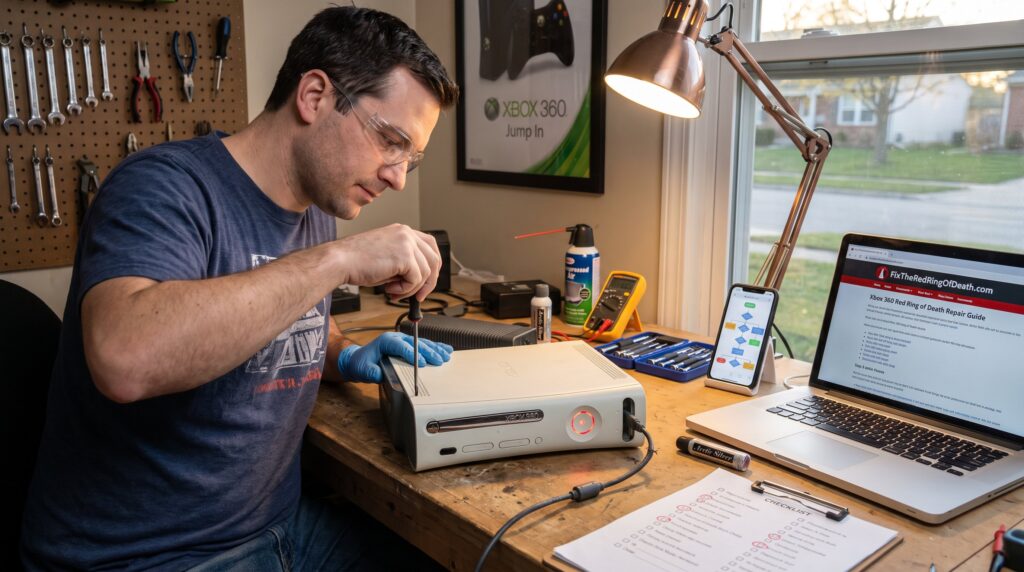
FixTheRedRingOfDeath.com helps players fix the Xbox Red Ring of Death and other gaming failures quickly. The site combines practical repair walkthroughs with game guides, reviews, and community tips aimed at hobbyists and competitive players. It promises clear diagnostics, step-by-step troubleshooting, and readable guides that reduce guesswork. Readers who want fast, actionable instructions, whether for an overheating Xbox 360 or a stubborn PC load error, find targeted help and a broader library of strategy content for popular titles.
Table of Contents
ToggleKey Takeaways
- FixTheRedRingOfDeath.com offers clear, step-by-step Xbox repair guides focused on resolving the Xbox Red Ring of Death quickly and safely.
- The site emphasizes starting with simple diagnostics like checking power cables and vents before moving to advanced repairs, minimizing risk during Xbox repair.
- DIY Xbox repair can be cost-effective for basic fixes, but advanced hardware issues often require professional service to avoid permanent damage.
- Besides hardware troubleshooting, FixTheRedRingOfDeath.com provides gaming guides and community tips to enhance gameplay and overall console performance.
- The website also supports troubleshooting for other consoles and PCs using a careful, symptom-based diagnostic approach.
- By combining practical Xbox repair advice with gaming strategy content, the site serves both technical repair needs and player enhancement interests.
What Is FixTheRedRingOfDeath.com? Overview And Mission
FixTheRedRingOfDeath.com is a specialist hub that focuses on Xbox hardware failures and wider gaming troubleshooting. Its mission is to get consoles and PCs back to playable condition with minimal downtime. The site publishes clear how‑tos, error‑code explanations, and practical tests players can run at home. It emphasizes speed: simple checks first (power, cables, vents), then deeper steps if needed.
Why that focus matters: the Xbox 360 Red Ring of Death (RROD) still appears in older hardware and resurfaces in collectors’ devices. The site documents precise symptoms, three red LEDs, boot loops, or specific error codes, and ties those to tested fixes. It also expands beyond repair to offer strategy guides, build tips, and community-sourced fixes so readers can both restore hardware and improve gameplay.
Xbox Repair Services And Signature Red Ring Fixes
FixTheRedRingOfDeath.com concentrates on detailed, stepwise repair guides for common Xbox failures rather than operating a physical shop. The site explains low-risk fixes like power cycling, checking the power brick, tightening connectors, and clearing dust, then walks into advanced diagnostics when those fail.
The site also links readers to its broader pillar resource for structured repair plans, which pairs symptom flowcharts with safe next steps to reduce mistakes. For readers who prefer a single reference, the article includes a practical plan that guides users from simple checks to escalation: start with cables and power, inspect vents and fans, then test for persistent error patterns and consider professional service. This structured approach helps reduce accidental damage during DIY attempts.
Practical note: many guides emphasize safety, unplug before opening, document screw positions, and avoid high‑heat reflows unless one has soldering experience. For a complete walkthrough that ties these steps together, the site points to a central repair guide for readers wanting the full sequence and recommended tools: repair reference.
Diagnosing The Red Ring: Step-By-Step Guide
Start with the clear fact: most RROD cases are diagnosable with three quick checks. First, inspect the external power brick and cables for frays, burns, or loose plugs. Second, observe the front ring LED pattern and any screen error text, three red lights usually indicate a general hardware failure. Third, check airflow: blocked vents or a dusty fan often cause overheating that triggers RROD.
Next steps with specifics: power‑cycle the console (unplug for 10 minutes), replace the power cable temporarily with a known-good cable, and try booting without external drives. If the red ring persists, look up the exact error code on the site’s reference pages and run the recommended diagnostics sequence. The article offers measured tests, temperature probe readings for the GPU area, boot logs from diagnostics discs, and stepwise disassembly photos, to reduce guesswork and limit trial‑and‑error damage.
DIY Repairs Vs Professional Repair — Risks And Costs
Short answer: DIY saves money but risks permanent damage: professional repair costs more but is safer for hardware‑level faults. Simple interventions, cleaning dust (safely with compressed air), reseating cables, or replacing a known‑bad power brick, often cost under $20 and restore many consoles. Advanced steps like GPU reflowing, replacing heat sinks, or swapping clamps demand soldering, a hot air station, and experience: mistakes can destroy the board.
Cost examples: a DIY cleaning kit and replacement cable might total $15–$40. A paid repair from a specialist or warranty service commonly ranges from $70–$150 depending on parts and labor. The site lists the tradeoffs with candid warnings and suggests a decision path: try low‑risk fixes first, document each step, and stop before any risky soldering if they lack proper tools. For readers uncertain about hardware failure causes, the site recommends consulting its targeted troubleshooting guides for clearer cost‑benefit signals.
Troubleshooting For Other Consoles, PC, And Common Issues
FixTheRedRingOfDeath.com also answers non‑Xbox errors with the same diagnostic mindset: identify a repeatable symptom, test the simplest causes, then escalate. For PCs that fail to boot, the site recommends RAM reseating, testing a single stick at a time, and swapping the PSU with a known‑good unit. For modern consoles with freezing or loading errors, it lists firmware checks, corrupt save file tests, and storage reformat protocols.
Concrete example: a console that boots but locks on a manufacturer logo can often be fixed by clearing local cache or reinstalling system software from recovery media. The site links to platform‑specific breakdowns, like the Xbox 360 error codes page, and offers precise step sequences so hobbyists can isolate whether an issue is hardware or software. For deeper hardware explanations, readers can consult a focused article on RROD causes and error codes at another site page that details failure modes and signs: detailed causes.
Gaming Guides, Reviews, Strategy And Community Resources
Beyond repairs, the site serves gamers with strategy guides, boss tactics, and platform reviews, content designed to improve play as well as hardware uptime. It publishes stepwise boss guides (example: MapleStory Pink Bean strategies), loadout suggestions for shooters like Battlefield, and build recommendations for PC players optimizing for performance and thermals.
A striking detail: the site catalogs exact in‑game timings and frame‑rate targets for several titles, helping readers match hardware tweaks to real outcomes. It also curates community threads and fan fixes, providing names, timestamps, and screenshots so users can replicate solutions. For cultural context and occasional industry notes, the site references mainstream coverage about the RROD’s legacy: one example highlights a commemorative poster released by Microsoft which reflects how the failure became part of console lore. That cultural note is corroborated by coverage in gaming press to show the RROD’s lasting footprint.
Conclusion
FixTheRedRingOfDeath.com blends practical repair guidance with gameplay resources to serve both hardware troubleshooters and active players. It prioritizes safe, testable steps, honest cost tradeoffs, and community‑vetted advice so readers can decide between DIY fixes and paid service. For players facing an RROD or a stubborn load error, the site offers focused procedures and clear next steps that reduce guesswork and get systems back into play.